Gira G1 230 V
No longer available


Price system (PS) not equal to 1, 14 = reduced discount.
No longer available. Not deliverable since 08/2025.
Note: For legal reasons, some products are not available in certain countries.
Price system (PS) not equal to 1, 14 = reduced discount.
No longer available. Not deliverable since 08/2025.
Note: For legal reasons, some products are not available in certain countries.
Necessary accessories
DIN rail adapters (DRA)
Systemgerät Türkommunikation
Optional accessories
Accessories
Spare part
For details on the exact scope of functions, please refer to the Gira online catalogue and the device’s technical documentation.
Features
Function in the Gira One system
- A gesture-controlled multi-touch display is used for operation.
- Connection and communication are via LAN or WLAN, depending on the variant.
- Integrated speaker.
- Integrated microphone with echo compensation.
- Gira G1 with flush-mounted connection module 230 V WLAN.
- Data communication via WLAN.
Potential applications and combinations
- As a multi-functional room operating device, the Gira G1 provides the following functions and combiation of functions:
- Gira One Client.
- Home station video.
Gira One server client
- Depending on the configuration, the Gira G1 can also be used as a client in systems with a Gira One server.
- Once activated, the Gira G1 displays the Gira interface of the Gira Smart Home App. Up to 250 Gira One devices can be displayed in this manner.
- A maximum of 50 Gira G1s can be used within a single Gira One project.
- In addition to the building control devices, the following functions are available in the Gira G1 when used as a client on the Gira One server:
- Direct function.
- Gira door communication.
- Online weather service.
Function in the Gira KNX system
- A gesture-controlled multi-touch display is used for operation.
- KNX room operating device
- Video home station
- Client for the following systems/servers: Gira HomeServer – eNet – Gira X1- Gira One
- Client for the following systems/servers: Gira HomeServer – eNet – Gira X1
- Client for following systems/servers - HomeServer – X1
- Integration of internet services
Properties as a KNX room operating device
- Intuitive user interface that can be adapted by the end user.
- System settings are protected via a PIN code.
- Switching and dimming (relative and absolute), dimming (incl. Dimming RGB, RGBW, and Tunable White), blind and roller shutter control, value transmitter, and scene auxiliary unit.
- Status display, display of date and time, display of inside and outside temperature.
- Up to 150 functions (six function folders or rooms with up to 25 functions each).
- More than 320 function icons.
- Up to 125 seven-day time clocks with 10 switching times each.
- Access to IP cameras.
- Audio control.
- PIN code for system settings.
- Room temperature controller in combination with the temperature sensor module (available as an optional extra), or KNX devices for room temperature measurement, e.g. touch sensor 3 Komfort.
- Up to 150 room temperature controller auxiliary units in combination with pushbutton sensor 3 Plus for KNX or CO2 sensor for KNX for room temperature measurement and regulation.
- Operating modes: Comfort, standby, night and frost or heat protection with their own respective set temperature (for heating and/or for cooling).
- Operating modes can be adapted individually.
- Comfort extension using the presence button.
- Frost or heat protection changeover using window status.
- Display of room temperature controller information.
- Control parameters for PI controllers and 2-point controllers can be set.
- A heating clock as seven-day time clock with 28 switching times.
- Room temperature controller auxiliary unit for sauna operation.
- Room temperature controller auxiliary unit for controlling air conditioning systems (fan coil) in conjunction with a KNX gateway for air conditioning systems.
- Adjustment of the temperature setpoint, air flow (direction, intensity) and operating mode.
Features as a video home station
- Camera changeover: specific selection of connected colour cameras.
- Controlling the door opener.
- Switching the ringing tone on and off.
- Ringtone can be selected from a choice of 10 melodies.
- Accepting calls.
- Adjustment of ring tone and voice volume.
- Internal calls.
- Floor call can be triggered using the pushbutton sensor for KNX.
Properties as a home station with SIP client
- Client function for SIP third-party systems from e.g. Comelit, TCS, SCHÜCO DCS Touch, 2N.
- SIP calls can be made directly or via a Registrar
- 64 internal calls possible e.g. to the concierge
- Early Media support for video image
Integration of internet services
- Gira weather service: display of the weather forecast for up to five cities (internet connection required).
The Gira G1 can also be used as a client for the following systems / servers: HomeServer Client
- Depending on the configuration, the Gira G1 can also be used as a client in systems with a Gira HomeServer. Following activation, the Gira G1 shows the interface design of the Gira HomeServer. Virtually all the functions available in the standard scope of delivery of the Gira HomeServer are supported, including the video home station and online weather service functions.
eNet Client
- Depending on the configuration, the Gira G1 can also be used as a client in systems with an eNet server. Following activation, the Gira G1 shows the interface design of the eNet SMART HOME system. All the functions of the eNet SMART HOME system are supported, including the video home station and online weather service functions.
Gira X1 Client
- Depending on the configuration, the Gira G1 can also be used as a client in systems with Gira X1. Following activation, the Gira G1 shows the interface design of the Gira X1. Up to 250 Gira X1 functions can be supported.
- In addition to the Gira X1 functions of the building control system, the following functions are available in the Gira G1 when used as a Gira X1 client: Direct function Gira door communication Online weather service Gira Alarm Connect security system with the functions
- –Arming
- –Disarming
- –Acknowledge message
- –Display alarms
- –Cancel alarms
Alarm Connect security system
- Activate.
- Deactivate.
- Acknowledge message.
- Display alarms.
- Turn off alarms.
- In addition to the functions of the Alarm Connect security system as a client for the system, the following functions are available in G1:
- –Gira door communication
- –Online weather service
- The functions of the KNX room operating device are not available when it is functioning as a client. The exact range of functions are described in the Gira online catalogue and the technical documentation for the device.
Technical data
| Power supply | AC 230 V, 50/60 Hz |
| WLAN standard | IEEE 802.11b/g/n - 2.4 GHz |
| Connection cable | |
| Ethernet specification | Cat.5e, cat.6, cat.6a, cat.7 |
| Power consumption | |
| Maximum | 7 W |
| Typical | 4 W |
| Minimum | 2 W |
| Display | |
| Type | TFT |
| Size | 15.3 cm (6″) |
| Number of colours | 16.7 M |
| Resolution | 480 x 800 px (WVGA), 155 ppi |
| Brightness | 350 cd/m² |
| Contrast ratio | 1:500 |
| Viewing angle | > 80° all round |
| Proximity sensor | |
| Range | Max. 50 cm |
| Detection range | 30° horizontal, 30° vertical |
| Protection class | IP21 |
| Installation depth | 32 mm |
| Ambient temperature | 0 °C to +45 °C |
Notes
- Suitable for indoor use only.
- Recommended mounting height: 150 cm above floor.
- Installation is performed on a deep device box (an electronics box is recommended for a LAN connection).
- Communication with the KNX installation uses the KNXnet/IP standard exclusively.
- An IP router for KNX must be used to connect the Gira G1 PoE to the KNX installation. Several Gira G1s can be operated on one IP router for KNX.
- To connect the Gira G1 230 V or G1 24 V to the KNX installation, a Gira IP router for KNX (firmware version 3 and higher) is required to ensure reliable communication in WLAN. The Gira IP router for KNX (firmware version 3 and higher) must be specifically equipped with the additional “Reliable data communication” function. Several Gira G1s can be operated on one Gira IP router for KNX (firmware version 3 and higher).
- Devices from index level I08 prepared for KNX Secure (additional firmware update required).
- Commissioning in the KNX system from ETS 5.5 or higher.
- Can be used as a home station in combination with the DCS IP Gateway.
- When planning the system, please observe the technical information on network planning in the device documentation.
- The Gira Project Assistant (GPA) is required for firmware updates. The GPA is available free of charge in the Gira download area.
- For the use of time switches, an internet connection to an NTP time server or a corresponding KNX clock (e.g. weather station Plus 2074 00) is required.
- When dimensioning the power supply, the total power consumption of all connected devices as well as the voltage drop in the line network must always be considered.
Scope of delivery
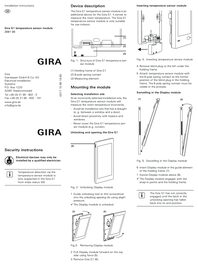
- Display module, holding frame, flush-mounted connection module PoE LAN
More links
Gira G1
More
Gira door communication configurator
The Gira door communication system enables systems of different types and sizes: from detached houses and apartment blocks to entire residential complexes. From simple audio and video systems to integration into a computer network. The Gira door communication configurator is a user-friendly online tool that makes the individual configuration of such systems a pleasure for house owners and administrators, but also for tradesmen and other professionals.
More



The file from the ZIP folder can be used to trigger a factory reset on the Gira G1 (up to firmware version 1.4.65). Please follow the instructions in the PDF file.
Basics, planning examples Door communication system Order no. 1736 90

Technical documentation (firmware version 3.2.148 or higher)
Operating instructions (firmware version 3.3.88 or higher)
To perform the update the Gira Project Assistant V 6.1 is required.